



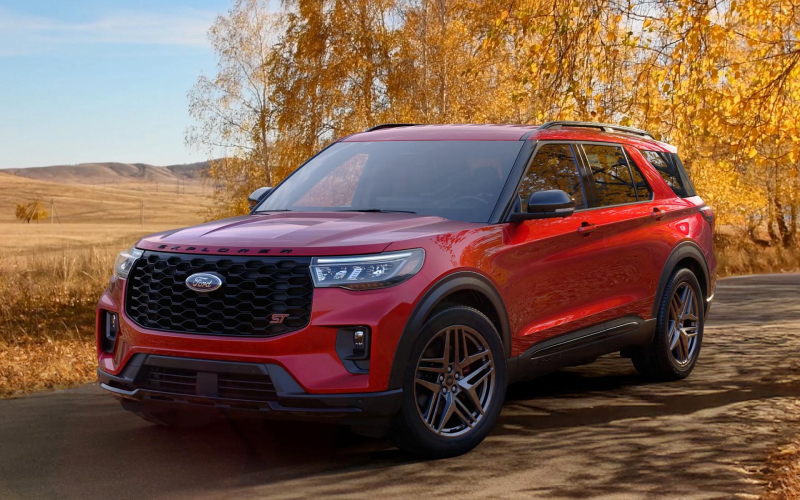
Lithia Springs Ford – BlueCruise on the 2026 Ford Explorer around Poweder Springs, GA — What to Expect From Day One
The idea of hands-free highway driving sounds futuristic until you try it and realize how naturally it fits into your daily routine. On the 2026 Explorer®, BlueCruise helps accelerate, brake, and steer on approved stretches of highway while you keep your eyes on the road, which makes longer runs around Poweder Springs, GA and the I-20 corridor feel more relaxing. It’s not a replacement for attentive driving; it’s a driving assistant that shines when the road opens up and you want to maintain smooth, consistent progress.
If you’re curious about what happens the first time you activate it, you’re not alone. New owners often ask how the system knows when to engage, what the driver monitor is doing, and how BlueCruise plays with other Ford Co-Pilot360® technologies on the Explorer®. The short version: when you’re on a pre-mapped section of highway and conditions allow, you’ll see prompts indicating hands-free readiness. The in-cabin driver monitoring system confirms you’re paying attention, and then BlueCruise takes over the tedious parts of lane keeping and speed control, creating a more composed experience.
What BlueCruise Is—and What It Isn’t
BlueCruise is a hands-free highway driving assistance feature that works on identified sections of divided highways. On the 2026 Explorer®, it builds on core driver-assist foundations like Adaptive Cruise Control and Lane Centering to deliver smooth, predictable support. It is not an autopilot for every situation: you remain responsible, must be ready to take control, and you’ll see the system hand back control when construction zones, lane merges, or heavy traffic patterns require it.
Think of it as a co-pilot for the easy parts of your route. If you drive regularly between Poweder Springs, GA and downtown via I-20 or you take weekend trips on I-285 and I-75, BlueCruise can help maintain steady gaps and centered positioning while you manage navigation, traffic flow, and situational awareness. You stay engaged; the Explorer® simply takes the strain off your shoulders on those long, predictable stretches.
Setup Steps and Best Practices
Getting started is straightforward, and the Explorer® makes it intuitive to confirm your settings the first time you head for the highway. Pair your profile, walk through the on-screen prompts in the Ford Digital Experience, and confirm that driver monitoring and alert preferences are set the way you like them. Once on an eligible highway, activate your cruise controls as you normally do and watch for the BlueCruise readiness indicator. When it turns on, you’ll see a clear, confidence-building notification.
- Know the cues: Watch for dashboard messages that show when the system is ready, active, or requesting driver intervention.
- Stay focused: The camera monitors your attention; keep your eyes on the road even while your hands are off the wheel.
- Expect transitions: BlueCruise may deactivate around complex interchanges, abrupt lane closures, or heavy congestion.
- Use smooth inputs: If you need to retake control, apply gentle steering and throttle—your Explorer® will hand back smoothly.
- Keep sensors clear: Make sure the windshield area and front sensors are unobstructed for optimal performance.
These basics help you build comfort quickly. Most drivers say the second or third outing is where BlueCruise “clicks,” especially on longer loops where the rhythm of the highway sets in. If your trim also includes the available 360-Degree Camera, you’ll appreciate how that helps at the start and end of the trip for tight parking or low-speed maneuvers.
How BlueCruise Fits the Explorer® Personality
The Explorer® already feels settled on the highway thanks to its rear-wheel-drive foundation and available Intelligent 4WD. BlueCruise complements that character by smoothing speed variations and lane centering so the SUV’s chassis can do its best work. Families will like how the ride feels calmer, conversations carry more easily, and the B&O® Sound System by Bang & Olufsen® can be enjoyed without the subtle on-off throttle inputs you’d make in stop-and-go traffic.
And because the 2026 model is designed around the Ford Digital Experience, you can expect a connected, continuously improving platform. Over-the-air updates can refine performance and add new capabilities, which is part of the appeal for drivers who like to keep technology current without swapping vehicles every year.
Local Scenarios Where BlueCruise Helps
Picture a morning drive eastbound toward Atlanta: traffic is flowing, but congestion is building ahead. With BlueCruise active, the Explorer® maintains a steady lane position and decelerates smoothly when the pack compresses. You remain ready to steer around obstacles or respond to unexpected lane closures, but a lot of the micro-adjustments that add fatigue are handled by the system. On the return, when the evening sun drops and traffic thins west of the perimeter, it’s the same story—calm steering, composed speed, and a little more energy left when you arrive home.
On weekends, if you’re heading to the Chattahoochee River parklands or linking up with friends near The Battery before a game, those multi-highway routes become less tiring. BlueCruise does its best work on predictable sections and then hands control back when interchanges or surface streets demand it.
FAQs to Round Out Your First Week
Frequently Asked Questions:
Will BlueCruise work in heavy rain?
BlueCruise relies on clear lane markings and sensor visibility. In adverse conditions, you may see reduced availability or earlier handoff prompts—exactly as designed for safety.
Does BlueCruise change how towing feels?
When you’re towing within the Explorer®’s 5,000-lb rating and conditions are right, BlueCruise can still help ease long highway stints. As always, stay fully engaged and consider disabling hands-free if crosswinds or grades make you more comfortable managing every input.
Can I adjust following distance?
Yes. The system lets you fine-tune gaps to match personal comfort and traffic flow while staying within its safety parameters.
How does it know I’m attentive?
A camera monitors your line of sight to confirm you’re watching the road. Look away too long and you’ll receive alerts, then a prompt to take over if needed.
Is BlueCruise the same on every trim?
Availability and plan terms vary by trim. Some trims are equipped with BlueCruise, and plan details can update via the Ford Digital Experience. Check your configuration or ask our team for the latest information.
Next Steps if You’re Curious
The best way to understand BlueCruise is to try it on familiar routes. A guided drive lets you see where it confidently maintains lane position, how transitions feel near interchanges, and what the alerts sound like when the system needs you to retake the reins. You’ll come away with a sense of when you want it active and when you prefer to steer the old-fashioned way.
Have more questions about living with driver-assist tech day to day? Our team is happy to walk through setup tips and local best practices so you can make the most of your Explorer®. We’re proud to be a resource for drivers across West Georgia, serving Austell, Bremen, and Poweder Springs with thoughtful demonstrations and real-world examples that go beyond a quick parking-lot overview. When you’re ready to experience the system for yourself, ask for a drive that includes a stretch of highway to see BlueCruise in action. You’ll quickly understand why many owners call it their favorite “unseen” feature of the SUV—right up there with the calm ride and family-friendly cabin.
For support that sticks with you after the keys are in your hand, Lithia Springs Ford offers tools, service options, and product expertise that make day-two and day-200 ownership just as confident as day one. From pairing your profile to understanding updates inside the Ford Digital Experience, we’re ready to help you get the most from your Explorer® every mile of the way.
Request more 2026 Ford Explorer information
Connect with us


- Car Trade-in
- Ford Bronco
- Ford Bronco Sport
- Ford Dealer
- Ford Escape
- Ford Expedition
- Ford Explorer
- Ford F-150
- Ford F-250
- Ford Maverick
- Ford Mustang
- Ford Service
- Ford Super Duty F-250
- Ford Super Duty F-350
- Ford Transit
- Lithia Springs Ford Dealer
- Lithia Springs Ford Service
- Lithia Springs Used Cars
- Uncategorized